| Welcome, Guest |
You have to register before you can post on our site.
|
| Online Users |
There are currently 6 online users.
» 0 Member(s) | 2 Guest(s)
Baidu, Bing, Facebook, Google
|
| Latest Threads |
Part 3659 update?
Forum: Part Requests
Last Post: Jacob Emcken
28 minutes ago
» Replies: 9
» Views: 729
|
We have a problem, again
Forum: Parts Authoring
Last Post: Willy Tschager
6 hours ago
» Replies: 14
» Views: 10,493
|
Fire logos
Forum: Parts Authoring
Last Post: Chris Böhnke
Yesterday, 21:52
» Replies: 5
» Views: 214
|
Part 8018 - Cockpit 3 x 6...
Forum: Part Requests
Last Post: Chris Böhnke
Yesterday, 21:50
» Replies: 2
» Views: 195
|
Missing Ninja 1998 Minifi...
Forum: Part Requests
Last Post: Chris Böhnke
2026-10-15, 21:56
» Replies: 16
» Views: 3,305
|
Missing Adventurers Minif...
Forum: Part Requests
Last Post: Zack Uhlenhuth
2026-10-15, 21:47
» Replies: 5
» Views: 1,839
|
Missing Adventurers Minif...
Forum: Part Requests
Last Post: Zack Uhlenhuth
2026-10-15, 21:45
» Replies: 0
» Views: 104
|
Lego movie 2 CMF
Forum: Part Requests
Last Post: Will
2026-10-15, 8:09
» Replies: 0
» Views: 150
|
Lego Ideas
Forum: Official Models
Last Post: Chris Böhnke
2026-10-14, 19:27
» Replies: 36
» Views: 68,573
|
Part Request
Forum: Part Requests
Last Post: Peter Grass
2026-10-14, 13:04
» Replies: 5
» Views: 1,134
|
|
|
| Am requesting parts 5315a and 5313c01. |
|
Posted by: Matthew - 2024-11-04, 19:38 - Forum: Part Requests
- Replies (4)
|
 |
Greetings! So, went to request these parts for Stud.io, and was told there was no 3D Model file for these parts.... So, while I am still waiting on the Zeppelin Container parts, and seeing as how I need the above parts of a Narrow Gauge Locomotive Project, I figured I'd ask here for help with the 3D model files. Thanks, have a great day! Rockatoa, Brickticks out!
|

|
|
| Duplo orientation of slopes and curves |
|
Posted by: Peter Blomberg - 2024-10-30, 22:37 - Forum: Official File Specifications/Standards
- No Replies
|
|
The unresolved issues with duplo bricks 11344, 70676, 70683, and 11169 seems to be the orientation. The rules for orienting duplo pieces are not as clear as with regular lego. A good example of the differences is duplo part 3664 and its equivalent regular lego part 49307. As there now are certified duplo slopes in both orientations, this calls for a deeper investigation.
Figure shows 3664 and 49307.
 doubly curved slopes.png (Size: 8.83 KB / Downloads: 39)
A slope is defined as a brick having less or more width at the top than at the bottom. This includes straight slopes, curved slopes, and inverted slopes.
Regular pieces tend to have the slope in the negative z direction. This applies to 'inverted', 'slope', and 'curved' pieces. A few exceptions exist: - "regular inverted" in the wrong direction (slope in positive x direction): 18653, 30099, 78666.
- "regular slope" in the wrong direction (slope in positive x direction): 45411, 45204, 45410, 54095, 54096, 1942.
- "regular curved" in the wrong direction (slope in positive x direction): 6183, 6184, 6215, 4744, 6216, 6214, 30075, 54097, 11290, 11301.
For regular bricks, the slope feature overrides the conventional size-dependent orientation with the longer dimension in the direction of positive x. Examples include 33243 and 65734.
Duplo pieces tend to give precedence to the longer dimension and thus have the slope in the positive x direction. The exception seems to be straight slopes.- "duplo inverted" in the negative z direction are: 11169 (unofficial).
- "duplo inverted" in positive x direction are: u977(2x3) to have it in the same orientation as the two-sided arches, 2301 (2x3), 98224 (2x4), 98252 (2x3), and 4198 (2x4). Here, the longer dimension rule is given precedence over the slope rule.
- "duplo curved" in the negative z direction are: 11170 (2x2), 11344 (unofficial), 70683 (unofficial).
- "duplo curved" in the positive x direction are: 98252 (2x3), 2302 (2x3), 98224 (2x4), 98223 (2x4), 31213 (2x4).
- "duplo slope" in the negative z direction are: 63871 (3x2), 35132 (4x4), 31170 (4x4), 6474 (2x2), 70676 (unofficial), 15580 (3x2), 49570 (unofficial), 35114 (3x2), 29303 (4x2).
- "duplo slope" in the positive x direction are: none
While the orientations of duplo pieces differ from the orientation of regular lego pieces, there is a pattern hidden here. With only a single exception among the certified pieces, the rules seem to be
- any duplo piece with a curved slope (both convex and concave, inverted or not) is oriented with the slope in the positive x direction (for clarity, this includes arches)
- any duplo piece with a straight slope is oriented with the slope in the negative z direction (there are currently no pieces having inverted straight slopes, but they are expected to be here)
- the longer side is oriented in the positive x direction
Rule 1 overrules rule 2 and rule 2 overrules rule 3.
Bricks 13358 (light grey, on left) and 6405 (dark grey, on right) exemplify these rules.
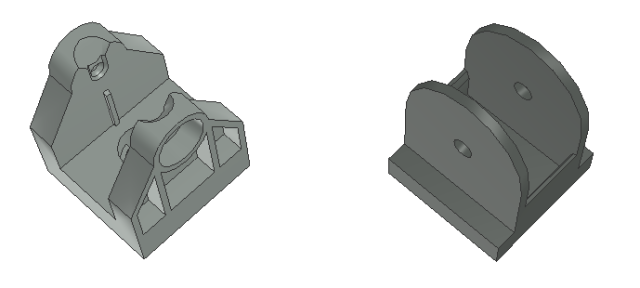
Patterned pieces may need to be rotated to show at least one patterned surface, but should have no effect on the orientation of the non-patterned piece.
If admins and part authors can agree to the above rules, the following conclusions can be made:- unofficial parts 70676 and 70683 can be certified in their current orientation (straight slopes in z-)
- unofficial parts 11344 and 11169 must be rotated before certification to yield curved slopes in x+
- certified part 11170 must be rotated to adhere to these rules and have its curved slope in x+
- certified parts 98223, 2302, 98252, 98224, 3664, 4198, and 2301, all having curved slopes in x+, can remain as they are
- certified parts 6474, 63871, 35114, 29303, 35132, and 31170, all having straight slopes in z-, can remain as they are
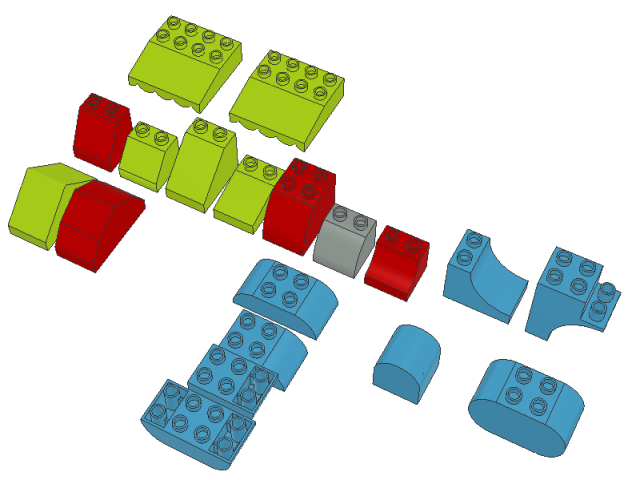
The overview shows certified straight slopes in lime, certified curved slopes in dark azure, unofficial parts in red, and the one certified curved slope in light grey.
|
|
|
|
| Pattern from Lego-App |
|
Posted by: Manfred Schaefer - 2024-10-30, 21:05 - Forum: Parts Authoring
- Replies (5)
|
|
Hello,
The patterns of the printed parts are probably also available in the Lego app.
Does anyone have experience of how to get these patterns? I mean how I can copy these patterns from the app.
Greetings
Manfred
|
|
|
|
|





![[Image: 5271.png]](https://img.bricklink.com/ItemImage/PN/77/5271.png)
![[Image: 4526%20issue.jpg]](https://bricksafe.com/files/stephan3321/Errors%20and%20Bugs/4526%20issue.jpg)