| Welcome, Guest |
You have to register before you can post on our site.
|
| Forum Statistics |
» Members: 6,392
» Latest member: Rand
» Forum threads: 6,597
» Forum posts: 54,325
Full Statistics
|
| Online Users |
There are currently 9 online users.
» 3 Member(s) | 1 Guest(s)
Applebot, Baidu, Bing, Facebook, Google, Orion Pobursky, Stefan Antener
|
| Latest Threads |
[BUG] Ldraw set files dow...
Forum: General LDraw.org Discussion
Last Post: Orion Pobursky
53 minutes ago
» Replies: 2
» Views: 75
|
Brickcraft - Building lik...
Forum: LDraw Editors and Viewers
Last Post: Fernando Cabiedes
5 hours ago
» Replies: 0
» Views: 54
|
I made 66219pr0001
Forum: Parts Authoring
Last Post: Willy Tschager
5 hours ago
» Replies: 1
» Views: 103
|
Technic 1994
Forum: Official Models
Last Post: Takeshi Takahashi
5 hours ago
» Replies: 39
» Views: 71,152
|
We have a problem, again
Forum: Parts Authoring
Last Post: Magnus Forsberg
11 hours ago
» Replies: 16
» Views: 10,710
|
Part 3659 update?
Forum: Part Requests
Last Post: Jacob Emcken
Yesterday, 17:07
» Replies: 9
» Views: 870
|
Fire logos
Forum: Parts Authoring
Last Post: Chris Böhnke
2026-10-16, 21:52
» Replies: 5
» Views: 341
|
Part 8018 - Cockpit 3 x 6...
Forum: Part Requests
Last Post: Chris Böhnke
2026-10-16, 21:50
» Replies: 2
» Views: 257
|
Missing Ninja 1998 Minifi...
Forum: Part Requests
Last Post: Chris Böhnke
2026-10-15, 21:56
» Replies: 16
» Views: 3,426
|
Missing Adventurers Minif...
Forum: Part Requests
Last Post: Zack Uhlenhuth
2026-10-15, 21:47
» Replies: 5
» Views: 1,889
|
|
|
| Spiked Tall Top Hair (24787) |
|
Posted by: Reece QK - 2023-01-27, 5:13 - Forum: Part Requests
- No Replies
|
 |
Hey Again!
Looking for part 24787 Spiked Tall Top Hairpiece aka Syndrome's Hair from the Disney CMF.
Hoping to use it for the Bride of Frankenstein if colored dark brown and had a little printing. Would love to render this minifig in 3D with hair if I can find the file!
I think the Syndrome hair would look surprisingly good (I've tested it in photoshop) - although a specific "Bride" hairpiece would be ideal if my Ideas set were to be created. Thank you for your help so far!
|

|
|
| LPub3D Bom |
|
Posted by: Andreas Hinz - 2023-01-26, 15:19 - Forum: LDraw Editors and Viewers
- No Replies
|
|
Hello everybody,
I tried to generate a BOM to my istruction and wanted to include part IDs. But although I setup the concerning configuration as described, the part numbers will not show up in the BOM.
I found several posts from Trevor describing how to trigger LPub3D to download a new part elements file it didn't work.
Does anybody know how to download that file manually?
Regards
Andreas
|
|
|
|
| Monster Hair (93556) - Hair Piece |
|
Posted by: Reece QK - 2023-01-25, 4:53 - Forum: Part Requests
- Replies (2)
|
|
Hey There!
Working on a project for Lego Ideas in the style of classic Monster Fighters sets and would like to use many of those great pieces.
Currently, there doesn't seem to be any piece for the "Monster Hair/Frankenstein Head", which has gone through a few different variations.
Such an interesting piece that comes in a few colors - all of which are printed. I can understand why it may have yet to be included.
If someone with modeling experience could help me out, I'd be so grateful!
Thanks!
|
|
|
|
| LPub3D System Editor |
|
Posted by: Andreas Hinz - 2023-01-23, 16:10 - Forum: LDraw Editors and Viewers
- No Replies
|
|
Hello everybody,
I'm working with LDCad and LPub3D since about 3 months and I like both apps very much. In my opinion they are still the best apps for construction and for making building instructions.
Regarding LPub3D I have one question concerning the system editor. Although I have set the system editor in the "Open With Setup" menu to notepad++ LPub3D always uses the internal editor, when opening those parameter files and so on.
Did anyone of you guys experience the same issue?
Thanks in advance for your support an greetings from Bremen, Germany
|
|
|
|
| New PT live date |
|
Posted by: Orion Pobursky - 2023-01-20, 3:02 - Forum: Parts Tracker Discussion
- Replies (1)
|
 |
Since I have a need to set deadlines for myself, the live date for the new PT will be February 1st. If that is missed, I'll resume normal PT ops (including the 2023-01 release) until March and try again.
|
|
|
|
| Call for Votes: Complementary conditional lines |
|
Posted by: Travis Cobbs - 2023-01-18, 3:02 - Forum: Standards Board
- Replies (7)
|
 |
Please vote on replacing the second paragraph of the overlaps section of the "LDraw.org Official Parts Library Specifications" document with the following:
Quote:All or part of a conditional line (line type 5) may not overlap all or part of any other conditional line (line type 5), with the exception of complementary conditional lines for curved primitives. Complementary conditional lines are placed at the end of curved primitives where those curved primitives may join with either a continuation of the curve, or with other geometry. In this case, the control points that are off of the edge of the curved primitive are placed so they are tangent to the curve.
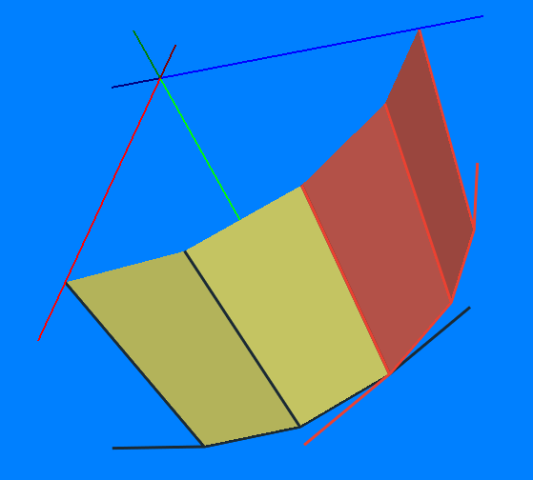
If two such curves are placed next to each other (for example to turn a quarter cylinder into a half cylinder), the conditional lines on the edge of each primitive will overlap exactly, and their control points will complement each other such that at most one will be rendered at any given time, and one of the two will always be rendered when appropriate. When other geometry is placed against such a curved primitive, nothing needs to be done if the geometry is tangent to the curve. If it is sloped further, then a complementary conditional line will be placed on the edge of that geometry, with the control points past the edge of the geometry configured to be tangent to the curve, and the two end points of the conditional placed to exactly overlap the complementary conditional line on the edge of the curved primitive.
Example:
The first and last conditional lines in a cyli primitive have a control point that is tangent to the cylinder. When two such cyli primitives join, the two conditional lines complement each other, like so:
|
|
|
|
|




![[Image: 98370.png]](https://img.bricklink.com/ItemImage/PL/98370.png)
