| Welcome, Guest |
You have to register before you can post on our site.
|
| Forum Statistics |
» Members: 6,389
» Latest member: enzo
» Forum threads: 6,596
» Forum posts: 54,321
Full Statistics
|
| Online Users |
There are currently 6 online users.
» 1 Member(s) | 1 Guest(s)
Applebot, Baidu, Bing, Google, Jose Alfonso
|
| Latest Threads |
[BUG] Ldraw set files dow...
Forum: General LDraw.org Discussion
Last Post: Orion Pobursky
29 minutes ago
» Replies: 1
» Views: 35
|
We have a problem, again
Forum: Parts Authoring
Last Post: Magnus Forsberg
2 hours ago
» Replies: 16
» Views: 10,632
|
I made 66219pr0001
Forum: Parts Authoring
Last Post: Matt G
Yesterday, 18:48
» Replies: 0
» Views: 73
|
Part 3659 update?
Forum: Part Requests
Last Post: Jacob Emcken
Yesterday, 17:07
» Replies: 9
» Views: 827
|
Fire logos
Forum: Parts Authoring
Last Post: Chris Böhnke
2026-10-16, 21:52
» Replies: 5
» Views: 306
|
Part 8018 - Cockpit 3 x 6...
Forum: Part Requests
Last Post: Chris Böhnke
2026-10-16, 21:50
» Replies: 2
» Views: 237
|
Missing Ninja 1998 Minifi...
Forum: Part Requests
Last Post: Chris Böhnke
2026-10-15, 21:56
» Replies: 16
» Views: 3,384
|
Missing Adventurers Minif...
Forum: Part Requests
Last Post: Zack Uhlenhuth
2026-10-15, 21:47
» Replies: 5
» Views: 1,875
|
Missing Adventurers Minif...
Forum: Part Requests
Last Post: Zack Uhlenhuth
2026-10-15, 21:45
» Replies: 0
» Views: 130
|
Lego movie 2 CMF
Forum: Part Requests
Last Post: Will
2026-10-15, 8:09
» Replies: 0
» Views: 177
|
|
|
| 30473 Lego Juniors |
|
Posted by: Bülent - 2023-09-26, 9:21 - Forum: Part Requests
- Replies (1)
|
 |
lego set 30473, Sloped Brick 2 x 4 x 2/3 No Nail, With Bottom Tube and Number 8 and Stylized Flame Print
BrickLink 88930pb039 • BrickOwl 427984 • LDraw 88930pr0002 • LEGO 16486
How can I get this piece? Can you help me?
|

|
|
| 4569 , 3968 , 3567 |
|
Posted by: SNIPE - 2023-09-22, 0:09 - Forum: Part Requests
- Replies (8)
|
 |
Hi,
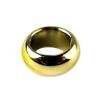
I would like to request these cool new parts:
4569 (edit: on PT)
3968
3567 (edit: on PT)
I can give more info if needed.
I made a dummy part 3567 by just overlaying a 2x2 inverted dish with a upside down 2x2 round tile.but that's obviously not going to be in the law library like that,
Thanks.
|
|
|
|
| [LDPE] 1.8.71 Released (faster start, text line selection bugfix, !DATA) |
|
Posted by: Nils Schmidt - 2023-09-19, 18:52 - Forum: Parts Author Tools
- Replies (12)
|
 |
Hey,
thanks again to Willy's feedback, this release fixes a few bugs, too.
One bug is related to the line selection (when you clicked on the line number in the text editor).
Another bug addressed the broken 3D view rotation via keyboard under Linux.
It should perform a little bit better than the previous version.
I implemented some basic support for the !DATA meta command for PNG images, but the file size is currently limited to 42KB. This size limit will be adjustable in the future.
![[Image: attachment.php?aid=12753]](https://forums.ldraw.org/attachment.php?aid=12753)
As always, you can download LDPE from this page:
http://nilsschmidt1337.github.io/ldparteditor/
Changelog:
(4 new features and 2 bug fixes)
With this release you will be able to...
- ...benefit from a slightly faster program start (technical details: JDK upgrade from version 17 to 21, LWJGL upgrade from version 3.2 to 3.3)
- ...use the !DATA meta command (currently limited to small PNGs of 42KB size)
- ...access the unit converter in a separate tab.
- ...have a new "double-arrow" icon for the "Update/Compile Subfile Data" function.
The following critical issues are fixed:
- [Linux-only] Rotating the 3D view via keyboard shortcut (not middle mouse button) warped the viewport and let it "jump".
- Selecting a line via click on the line number in the text editor and then showing the selection in the 3D view, selected the next line, too.
The program was tested intensively with "real world" files.
However, something can go wrong in about 140.000 lines of code.
Installation on Windows:
- Download and extract LDPartEditor_win32_x64.zip
- Run LDPartEditor-1.8.71.msi
- Start LDPartEditor from the start menu
Installation on Linux:
- Download and extract LDPartEditor_linux_x64.zip
- Install ldparteditor_1.8.71-1_amd64.deb
- Start LDPartEditor from the menu or via launcher
Installation on Mac OS X:
- Download and extract LDPartEditor_mac_x64.zip
- Mount LDPartEditor-1.8.71.dmg
- Drag LDPartEditor.app to the Applications folder
- Copy ldparteditor.sh to your home folder
4a. Open a Terminal.app and run ./ldparteditor.sh
4b. Or open a Terminal.app and run /Applications/LDPartEditor.app/Contents/MacOS/LDPartEditor
I listen carefully to your requests and possible complaints. Please leave me a message, with your thoughts and wishes to further improve the software.
LDPE is a 3D CAD application: The overall system requirements are higher. While I recommend to use a powerful 64-bit multicore system, it could be possible, to run LDPE on older machines as well.
System Requirements:
Minimum System Requirements:
- OpenGL 2.1 compatible Graphics Card
- Operating System (64-bit): Windows [7 or newer], Linux [e.g. Ubuntu Linux >=14.4], Mac OS X [>=10.6]
- CPU: Multicore-Processor e.g. Intel Core 2 Duo or AMD Athlon II (>2.0Ghz)
- RAM: 4GB
- Video-Memory: 1 GB
- Free Disk Space: 150 MB
Recommended Requirements:
- Operating System (64bit): Windows 7,8,10,11, Linux [e.g. Ubuntu Linux >=14.4], Mac OS X [>=10.6]
- OpenGL 3.3 compatible Graphics Card
- CPU: Multicore-Processor with 4 cores (or more)
- RAM: >4 GB
- Video-Memory: >1 GB
- Free Disk Space: 500 MB
- For a faster start, LDPartEditor and the LDraw™ library should be installed on an SSD.
|
|
|
|
| OMR down? |
|
Posted by: Christoph Reum - 2023-09-12, 20:35 - Forum: General LDraw.org Discussion
- Replies (9)
|
|
Just wanted to browse the OMR - getting an DNS error on phone and workstation via two different connections & not getting the page.
If its known or this is a doubled post I am sorry and please directly delete the post.
|
|
|
|
|