| Welcome, Guest |
You have to register before you can post on our site.
|
| Forum Statistics |
» Members: 6,244
» Latest member: ParkerJ
» Forum threads: 6,581
» Forum posts: 54,218
Full Statistics
|
| Online Users |
There are currently 6 online users.
» 0 Member(s) | 1 Guest(s)
Applebot, Baidu, Bing, Google, Yandex
|
| Latest Threads |
Missing Stingrays/Hydrona...
Forum: Part Requests
Last Post: Zack Uhlenhuth
10 hours ago
» Replies: 8
» Views: 1,503
|
Speed Champions
Forum: Official Models
Last Post: Magnus Forsberg
Yesterday, 21:49
» Replies: 30
» Views: 62,714
|
3d modelling
Forum: Off-Topic
Last Post: Jeff Jones
Yesterday, 21:06
» Replies: 2
» Views: 237
|
Parts Request: LEGO Zelda...
Forum: Part Requests
Last Post: SNIPE
2026-09-21, 1:39
» Replies: 1
» Views: 508
|
Part Request
Forum: Part Requests
Last Post: Orion Pobursky
2026-09-20, 17:15
» Replies: 1
» Views: 169
|
Technic 1994
Forum: Official Models
Last Post: Takeshi Takahashi
2026-09-19, 8:05
» Replies: 31
» Views: 64,952
|
Town, Trains and Paradisa...
Forum: Official Models
Last Post: Takeshi Takahashi
2026-09-19, 2:11
» Replies: 29
» Views: 14,650
|
Spider-Ham
Forum: Part Requests
Last Post: James Simpson
2026-09-16, 21:34
» Replies: 1
» Views: 582
|
Missing Snowtrooper Parts
Forum: Part Requests
Last Post: Chirila
2026-09-16, 18:19
» Replies: 3
» Views: 401
|
Existing Part Edit Reques...
Forum: Parts Authoring
Last Post: Rene Rechthaler
2026-09-13, 14:38
» Replies: 170
» Views: 452,768
|
|
|
| Aligning parts using rotation scripts |
|
Posted by: David Manley - 2021-12-16, 8:24 - Forum: LDraw Editors and Viewers
- Replies (35)
|
 |
1. Background
A few months ago, I wrote a Lua script for LDCad to animate the rotation of a 4 (or 3) bar linkage, posting the script to the LDraw forum. Writing that script got me thinking about writing a script which would determine the joining point for two parts, each being rotated about their own designated rotation point.
I’ve now written a version of the script. This post describes how to use the script and provides details about downloading and installing the script.
2. Expectations
The aim of the script is to provide a point-and-click mechanism to rotate parts within LDCad. Conceptually, the parts serve different purposes; some are identified as a rotation origin, some are identified as being aligned to another part and some parts are those which are being rotated. Although this post tends to use the term part, the script can also be used with sub-files.
The script provides solutions for two different scenarios - rotating a single part to a designated alignment point
- rotating two parts to a join point common to both parts
Images from an incomplete model of set 9748-1 (a current work-in-progress) illustrate the script's capabilities.
|

|
|
| Help with edge prim |
|
Posted by: Willy Tschager - 2021-12-15, 19:27 - Forum: Parts Authoring
- No Replies
|
 |
Anybody with a suitable code using edge prims for these intersections?
1 9 93 -103 70 4 0 0 0 20 0 0 0 4 4-4cylo.dat
4 9 89.304 -85 71.531 91 -85 80 91 -103 80 89.304 -103 71.531
4 9 95.828 -103 67.172 100 -103 71 100 -85 71 95.828 -85 67.172
1 9 96 -92 60 4 0 0 0 0 -4 0 11 0 2-4cyli.dat
3 9 92 -92 70 92 -92 60 60 -92 60
1 9 79.093 -90 65.966 .895 11.6199 0 0 0 3 -2.864 3.6315 0 4-4cyli.dat
w.
|
|
|
|
| LDInstruction |
|
Posted by: Stefan Frenz - 2021-12-12, 13:09 - Forum: LDraw Editors and Viewers
- Replies (52)
|
 |
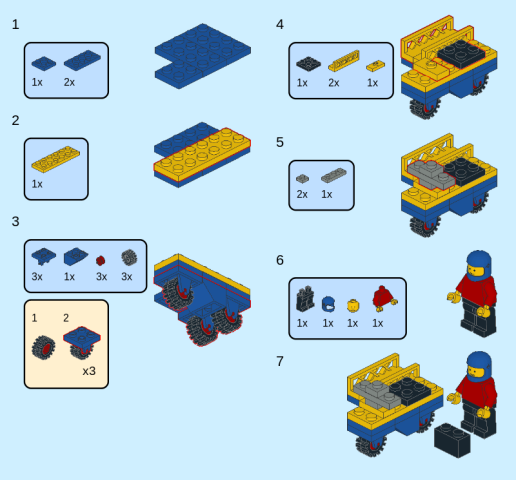
Thanks to all helping me with LDInspector. In the last weeks I wrote a new module to generate instructions from a MPD model. It is far from being complete or feature-rich like LPub3D, but for me it suits better in some situations. The generated file is a LibreOffice Draw (odg) file, so further modification is very easy and only limited by LibreOffice.
You may give it a try if you have Java installed (no need for JavaFX for this module). You only need the jar file and a context definition file LDInspector.ldi - you can use the one created by LDInspector or create one containing one line per LDraw part source like in
Code: 0 FILE LDIContext.ldi
0 LDInspector context configuration
0 Name: LDIContext.ldi
0 Author: LDInspector
0 !LDINSP PART_SOURCE [type=Directory] [origin=ofc] [dest=/path/to/ldraw/]
0 !LDINSP PART_SOURCE [type=ZIP] [origin=uno] [dest=/path/to/ldraw/Unofficial/ldrawunf.zip]
To start the GUI, please use
Code: java -cp ldinstr.jar ldinsp.guisw.InstructionHelper
For a slightly modified version of the 603 model you should get an output odg file looking like the attached image:
To me this approach has several PROs and CONs:- Pro: single-step processor: there are no commands having range limits ("start-end"), the commands only set parameter ("from here on").
- Pro: stable behavior even for large projects (tested with >320 pages and >350 steps).
- Pro: most options may be changed for each step (for example highlight-color etc.).
- Pro: real WYSIWYG for current model step, option to use and/or overwrite LDCad/MLCad ROTSTEP angles.
- Pro/Con: not full-featured instruction commands (no arrows, no lines, no number editing), but fully editable in LibreOffice (free placement for all items, changing of all background/frame colors, adding elements like arrows and lines, editable text and numbers).
- Pro/Con: focus on steps instead of pages, so (pro) you can later change steps with LDCad without risking already done layouts but (con) you have to re-run the build process to see page layout changes.
- Pro/Con: orthogonal projection, no option to have perspective projection.
- Pro/Con: completely software rendered, no OpenGL/Vulkan/DirectX acceleration (a bit slow, but no special driver/hardware/library required).
- Con: no WYSIWYG-gui for pages.
I would appreciate any feedback or even "this could be done easier using x, y or z".  If there is interest in this project, the GUI will have to support the process much more than it does at the moment like hinting about options (left align, center align, right align, fixed offset), support in creating a valid LDInspector.ldi file and maybe a page-preview for multiple steps. If there is interest in this project, the GUI will have to support the process much more than it does at the moment like hinting about options (left align, center align, right align, fixed offset), support in creating a valid LDInspector.ldi file and maybe a page-preview for multiple steps.
Best regards and thanks in advance
Stefan
|
|
|
|
|




