| Welcome, Guest |
You have to register before you can post on our site.
|
| Latest Threads |
Brickcraft - Building lik...
Forum: LDraw Editors and Viewers
Last Post: Fernando Cabiedes
2 hours ago
» Replies: 0
» Views: 36
|
I made 66219pr0001
Forum: Parts Authoring
Last Post: Willy Tschager
2 hours ago
» Replies: 1
» Views: 94
|
Technic 1994
Forum: Official Models
Last Post: Takeshi Takahashi
3 hours ago
» Replies: 39
» Views: 71,132
|
[BUG] Ldraw set files dow...
Forum: General LDraw.org Discussion
Last Post: Orion Pobursky
7 hours ago
» Replies: 1
» Views: 63
|
We have a problem, again
Forum: Parts Authoring
Last Post: Magnus Forsberg
9 hours ago
» Replies: 16
» Views: 10,677
|
Part 3659 update?
Forum: Part Requests
Last Post: Jacob Emcken
Yesterday, 17:07
» Replies: 9
» Views: 850
|
Fire logos
Forum: Parts Authoring
Last Post: Chris Böhnke
2026-10-16, 21:52
» Replies: 5
» Views: 327
|
Part 8018 - Cockpit 3 x 6...
Forum: Part Requests
Last Post: Chris Böhnke
2026-10-16, 21:50
» Replies: 2
» Views: 249
|
Missing Ninja 1998 Minifi...
Forum: Part Requests
Last Post: Chris Böhnke
2026-10-15, 21:56
» Replies: 16
» Views: 3,414
|
Missing Adventurers Minif...
Forum: Part Requests
Last Post: Zack Uhlenhuth
2026-10-15, 21:47
» Replies: 5
» Views: 1,886
|
|
|
| [LDPE] 1.8.67 Released (scientific num. / bugfix: manipulator pos/ library.ldraw.org) |
|
Posted by: Nils Schmidt - 2023-03-26, 16:43 - Forum: Parts Author Tools
- Replies (5)
|
 |
Hi,
this release adds hints when using the scientific number format.
It corrects a 3D manipulator bug and five other issues.
The download of data from library.ldraw.org works now!
![[Image: attachment.php?aid=12753]](https://forums.ldraw.org/attachment.php?aid=12753)
As always, you can download LDPE from this page:
http://nilsschmidt1337.github.io/ldparteditor/
Changelog:
(1 new feature and 6 bug fixes)
With this release you will be able to...
- ...see a hint on numbers with scientific notation (you can also "quick fix" these numbers).
The following critical issues were fixed:
- The 3D manipulator orientation got polluted.
- LDPE was not able to download from library.ldraw.org
- The tabs in the 3D editor couldn't be moved around. The text editor was not affected.
- SymSplitter cutted with data from subfiles too, in addition to the cutting plane (see images on https://github.com/nilsschmidt1337/ldpar...issues/959 )
- Intersector calculated sometimes wrong results with some triangles missing.
- It was not possible to do a "copy + transform" action on MacOS X with the cursor keys (see https://github.com/nilsschmidt1337/ldpar...issues/958 ).
The program was tested intensively with "real world" files.
However, something can go wrong in about 140.000 lines of code.
Installation on Windows:
- Download and extract LDPartEditor_win32_x64.zip
- Run LDPartEditor-1.8.67.msi
- Start LDPartEditor from the start menu
Installation on Linux:
- Download and extract LDPartEditor_linux_x64.zip
- Install ldparteditor_1.8.67-1_amd64.deb
- Start LDPartEditor from the menu or via launcher
Installation on Mac OS X:
- Download and extract LDPartEditor_mac_x64.zip
- Mount LDPartEditor-1.8.67.dmg
- Drag LDPartEditor.app to the Applications folder
- Copy ldparteditor.sh to your home folder
4a. Open a Terminal.app and run ./ldparteditor.sh
4b. Or open a Terminal.app and run /Applications/LDPartEditor.app/Contents/MacOS/LDPartEditor
I listen carefully to your requests and possible complaints. Please leave me a message, with your thoughts and wishes to further improve the software.
LDPE is a 3D CAD application: The overall system requirements are higher. While I recommend to use a powerful 64-bit multicore system, it could be possible, to run LDPE on older machines as well.
System Requirements:
Minimum System Requirements:
- OpenGL 2.1 compatible Graphics Card
- Operating System (64-bit): Windows [7 or newer], Linux [e.g. Ubuntu Linux >=14.4], Mac OS X [>=10.6]
- CPU: Multicore-Processor e.g. Intel Core 2 Duo or AMD Athlon II (>2.0Ghz)
- RAM: 4GB
- Video-Memory: 1 GB
- Free Disk Space: 100 MB
Recommended Requirements:
- Operating System (64bit): Windows 7,8,10, Linux [e.g. Ubuntu Linux >=14.4], Mac OS X [>=10.6]
- OpenGL 3.3 compatible Graphics Card
- CPU: Multicore-Processor with 4 cores (or more)
- RAM: >4 GB
- Video-Memory: >1 GB
- Free Disk Space: 512 MB
- For a faster start, LDPartEditor and the LDraw™ library should be installed on an SSD.
|

|
|
| Parts Tracker feature addition |
|
Posted by: Orion Pobursky - 2023-03-25, 22:33 - Forum: Parts Tracker Discussion
- No Replies
|
 |
I've added two new features to the Parts Tracker:
- Track/Untrack a part. When you submit or review a part, events for that part are emailed to you daily. If you wish to get updates for other parts or stop getting updates you can click the button to do so.
- Flag for deletion. Part reviewers can flag a part for deletion, if need. Admin will review the part and either delete it or unflag it.
P.S.: While I was typing this I realized that it would be useful for the part author to be able to flag their own parts. I'll implement that shortly.
|
|
|
|
| Are logos primitives or subfiles? |
|
Posted by: Magnus Forsberg - 2023-03-21, 21:25 - Forum: Parts Tracker Discussion
- Replies (12)
|
 |
There are some new logo primitives on the Part Tracker
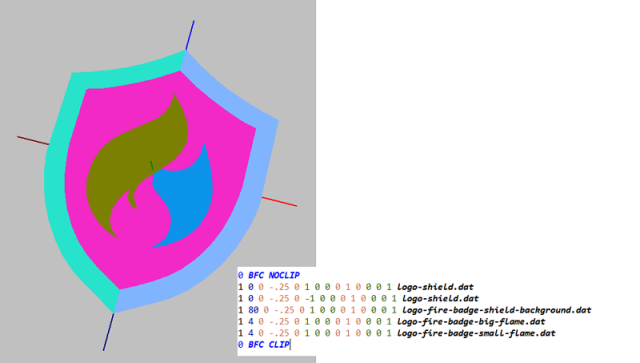
I see a problem with all these logo primitives. They never seem to fit the need, in more that a few parts.
And that's why I think they should be treated as templates, and are free to use inlined, whenever it's possible.
We allready have some fonts, letters and numbes as primitives. Could be used as primitives, but are best used inlined to get correct kerning between the letters, for instance. But we have logos as both primitives and subfiles, official in the library.
The logos need to be detailed enough so that they are possible to enlarge. But the downside is that they might become ridiculously detailed when used shrunken on smaller parts. (Yes, I'm thinking of the Ferrari horse on the 1x1 tiles. They are stupidly detailed).
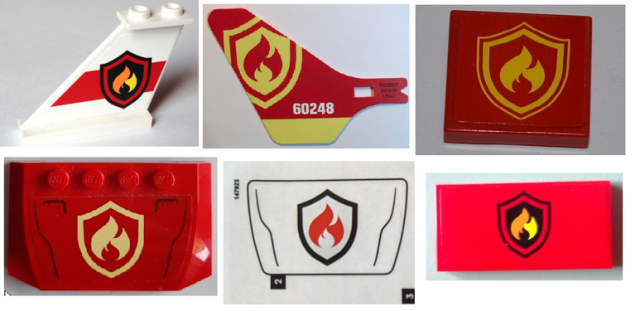
All these logos on parts with the new Fire badge logo, are different. One, or two, borders around the badge, of different thickness.
With or without sharp, or sloping, corners.
I don't want to see any more fire badge primitives. These 4 are made and useful. They can be used together as one badge, rescaled, but should preferably be used as templates. They might need reshaping.
So, my question is: - Are the logos primitives or subfiles?
|
|
|
|
| Renumber parts, do not resubmit. |
|
Posted by: Orion Pobursky - 2023-03-21, 21:04 - Forum: Parts Tracker Discussion
- Replies (1)
|
|
If a part needs to be renumbered, please contact me to renumber it.
Do not resubmit the renumbered parts as new parts. This loses the comment history on the old parts and clutters the PT with unneeded, orphaned parts.
If you are unsure, do not assume an answer, ask me or one of the other part reviewers before submitting.
|
|
|
|
| LDraw All-In-One-Installer 2023-01 v1 now available |
|
Posted by: Willy Tschager - 2023-03-19, 17:32 - Forum: LDraw.org Announcements
- No Replies
|
 |
An updated version of the LDraw All-In-One-Installer, in short AIOI, containing the LDraw Parts Library update 2023-01 with 121 new files (including 84 new parts and 9 new primitives) has been released.
The AIOI supports Windows XP (Home and Pro), Windows Vista or higher (all versions). There are two installer files available: Use the 64 Bit AIOI to install all the main 64 Bit programs, while the older 32 Bit programs are offered in a separated .exe file. Please note that only the 64 Bit version contains the LDraw Parts Library. If you want to use the 32 Bit programs it is mandatory that the library has been installed previously. The Installer will NOT run on Windows 95, 98, ME, NT Ver 4, 2000, or XP below SP2.
It contains the following changes:
* Update to Parts Library 2023-01
* Update to MLCad.ini 2023-01
* Update to Offline Parts Catalog 2023-01
You can download the AIOI from:
LDraw.org >> Help >> Get Started >> Windows >> LDraw All-In-One-Installer
Many thanks to all the programmers who contributed to this release.
Willy Tschager
(LDraw.org Content Manager)
|
|
|
|
| Parts Tree Amendment |
|
Posted by: Nathan S - 2023-03-18, 18:37 - Forum: General LDraw.org Discussion
- Replies (4)
|
 |
LEGO continues to put out more decorated pieces, and LDraw has put a lot of efforts into creating them for the library. And of course, this is happening while overall new pieces are also being added. Given the increase then in the parts library, I was curious if there was any thought given to separating out those decorated parts in the part three. For example: Brick, Bricks Decorated, Tile, Tile Decorated. BrickLink has done this with their catalog, and it has been a great help for navigation.
|
|
|
|
|




