| Welcome, Guest |
You have to register before you can post on our site.
|
| Online Users |
There are currently 7 online users.
» 1 Member(s) | 2 Guest(s)
Baidu, Bing, Facebook, Google, Pedro.Gosis
|
| Latest Threads |
Marvel Parts
Forum: Part Requests
Last Post: James Simpson
7 hours ago
» Replies: 5
» Views: 302
|
LDraw Colors for OpenScad...
Forum: LDraw Editors and Viewers
Last Post: Hageta
Yesterday, 17:23
» Replies: 0
» Views: 73
|
LDraw.org 2026-10 Parts U...
Forum: LDraw.org Announcements
Last Post: Hageta
Yesterday, 16:49
» Replies: 3
» Views: 182
|
We have a problem, again
Forum: Parts Authoring
Last Post: Chris Böhnke
2026-10-25, 22:26
» Replies: 17
» Views: 11,686
|
Aquazone 1995-1996
Forum: Official Models
Last Post: Chris Böhnke
2026-10-25, 17:32
» Replies: 3
» Views: 535
|
[COMPLETE] Missing Ninja ...
Forum: Part Requests
Last Post: Zack Uhlenhuth
2026-10-24, 22:28
» Replies: 18
» Views: 4,299
|
61880 Tents
Forum: Part Requests
Last Post: Zack Uhlenhuth
2026-10-24, 17:03
» Replies: 0
» Views: 159
|
Technic 2026
Forum: Official Models
Last Post: Orion Pobursky
2026-10-22, 22:49
» Replies: 6
» Views: 8,350
|
Metallic Dark Silver deco...
Forum: Parts Authoring
Last Post: Chris Böhnke
2026-10-22, 17:12
» Replies: 2
» Views: 404
|
Technic 1994
Forum: Official Models
Last Post: Takeshi Takahashi
2026-10-22, 16:24
» Replies: 41
» Views: 73,178
|
|
|
| LDCad pane docking |
|
Posted by: Jetro de Château - 2016-01-15, 9:11 - Forum: LDraw Editors and Viewers
- Replies (4)
|
 |
I'm working my way through the LDCad tutorials and trying to build some models to get the hang of it.
There are a couple of things that I can't quite figure out. One of them is the location/docking of panes. Somehow my color bin and parts bin panes have become undocked and I can't find a way of docking them again. How do I dock them again so they are not on top of the compass if I move them to the left side?
|

|
|
| [LDPartEditor] > Requests |
|
Posted by: Gerald Lasser - 2016-01-14, 21:45 - Forum: Parts Author Tools
- Replies (7)
|
|
Hi Nils,
After doing some parts with the LDPE I am getting pretty much used to it, although I did by far not use all the features yet, or may be have not even discovered them all. I do have some requests or suggestions to make editing easier.
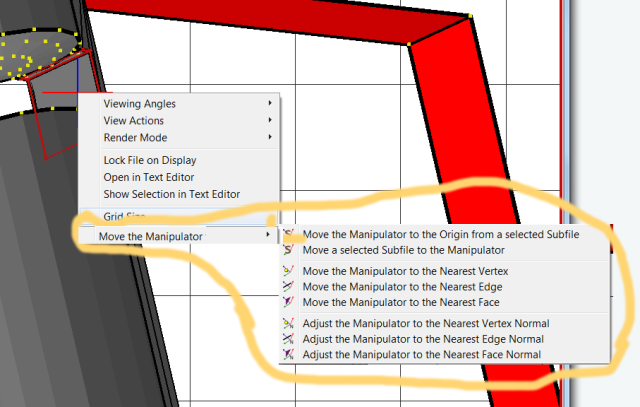
PROPOSAL: Add "Move Manipulator to Origin of selected Subfile" to the Context Menu
I find it a bit tedious to go up to the menu bar and set the manipulator to the subfile I selected. It simply take a lot of time.
It would be great if this can be implemented in the RMB Context Menu. This is basically the way I set the Manipulator most of the time. Either in the RMB Context Menu or with a keyboard shortcut (Ctrl+ something) to do the same.
PROPOSAL: A better way to skew RECT Prims
I did not find a proper way till now to move a rectangle-prim in place when it is out of a plane. I.e. if I want to put it slanted I need to check two vertices, calculate their distance, translate this into the transformation matrix of the rect-prim to put it to the correct angle and the correct vertex.
It would be good if I could:
- Select a primitive (Rect) (1)
- Select the two vertices or edge lines where the rect shall touch (2)
- LDPE will calculate the transformation matrix -> Result in the final Pic
 LDPE-Prop-AlignPrim1.png (Size: 23.72 KB / Downloads: 5)
LDPE-Prop-AlignPrim2.png (Size: 11.34 KB / Downloads: 5)
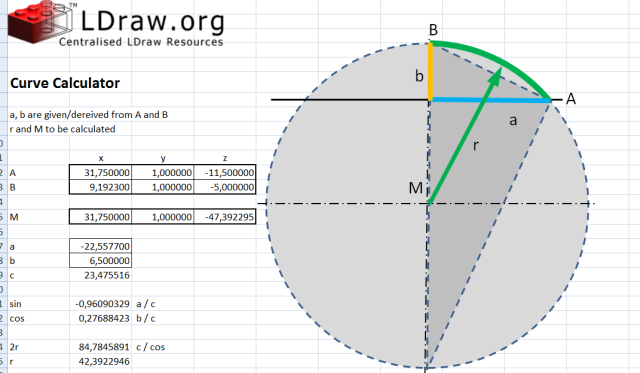
PROPOSAL: Align Circles or Cricle Sections
Sometimes there is a need to find a circle-section that fits between two specific points, A and B. I have also attached a picture to show the task. I need to calculate the radius ® of the circle and the center (M) I do this now with a small XLS tool which serves the purpose perfectly. It would be neat if this could be "onboard" of LDPE.
PROPOSAL: Draw Selection Only/Draw Until Selection
You have the possibility oin the text editor to "Show Selection in 3D View" This selects also the line sin the 3D Editor and I can jointly move it, that is really good (and I just discovered after finding the link to the manual again:-)
Now sometimes I would like to see only a specific set of lines (without the rest of the part) or to draw only to a certain line.
Those two selections would be great:
- Draw Selection (in Text Editor)
- Draw Until Selection (in Text Editor)
I would need this function to help properly sort the lines in a file and to clean it up.
PROPOSAL: Group Function
This would also aid in cleanign and sorting a file. I.e. In the 3D Editor I can select a number of items (quads, lines etc.) which might not be at one position in the file, however they might belong together. So
- I select them,
- then RMB "join selection in text Editor"
- may be a prompt is made to add a comment to allow you finding the code later.
QUESTION: Cond-Line Colors
Why are the Condlines shown in two colors? I could not figure out a reason for that.
A lot of stuff... but I hope this might be useful/helpful for others as well
Gerald
|
|
|
|
| 2016/2017 LDraw.org Steering Committee (SteerCo): List of nominees |
|
Posted by: Willy Tschager - 2016-01-14, 12:40 - Forum: LDraw.org Announcements
- No Replies
|
 |
A quick reference to the candidates for the 2016/2017 LDraw.org Steering Committee (SteerCo) election. The information is drawn from the nomination process and corrections are welcome, please email the webmasters.
Candidates are listed in alphabetical order by last name and no ranking or endorsement should be inferred from their position on the list. The following table summarizes the status of each candidate in the format:
Nominee name: Nomination Status (Nominator, Second)
Chris Dee: Accepted (Max Martin Richter, Travis Cobbs)
Philippe Hurbain: Accepted (Max Martin Richter, Travis Cobbs)
Max Martin Richter: Accepted (Willy Tschager, Philippe Hurbain)
Orion Pobursky: Accepted (Max Martin Richter, Travis Cobbs)
Willy Tschager: Accepted (Max Martin Richter, Travis Cobbs)
Magnus Forsberg: Not Yet Accepted (Max Martin Richter, Travis Cobbs)
Michael Heidemann: Not Yet Accepted (Max Martin Richter, Travis Cobbs)
Travis Cobbs: Declined (Max Martin Richter)
Tim Gould: Declined (Max Martin Richter, Travis Cobbs)
Steffen Lohse: Declined (Max Martin Richter, Travis Cobbs)
Roland Melkert: Declined (Max Martin Richter, Travis Cobbs)
Replies to this have been disabled. The nominations thread is where they belong.
w.
|
|
|
|
| Color bug on export from LDView to POV .. lg_color.inc |
|
Posted by: Brian - 2016-01-11, 5:32 - Forum: General LDraw.org Discussion
- Replies (1)
|
|
Hi,
When I export from LDView to POV, the color 151 VERY LIGHT BLUISH GRAY appears as green in POV ... After some investigation I found the RGB color as written in the lg_color.inc file is 14,94,77 .. which is green .. it should be 230,227,224 .. #E6E3E0 .. instead.
Code: // I changed the code to this
// 151 VERY LIGHT BLUISH GRAY / 208 LIGHT STONE GREY [PEERON]
#declare lg_very_light_bluish_grey = texture {
pigment { color srgb <230,227,224>/255 }
finish { lg_solid_finish }
}
// Code as found
// 151 VERY LIGHT BLUISH GRAY / 208 LIGHT STONE GREY [PEERON]
#declare lg_very_light_bluish_grey = texture {
pigment { color srgb <14,94,77>/255 }
finish { lg_solid_finish }
}
|
|
|
|
| New moulds with hollow studs and inner stopper ring |
|
Posted by: Owen Burgoyne - 2016-01-10, 22:25 - Forum: Parts Authoring
- Replies (13)
|
 |
After having recently opened up a small can of worms on the Parts Tracker with introducing the hollow stud with the inner stopper ring, it got me thinking about parts that have this inner stopper ring as part of their recent moulding but still have the same Design ID from their inception.
For example, 3665 "Slope Brick 45 2 x 1 Inverted" is now produced with this inner stopper (I have a spare one to hand) but is only modelled in LDraw without. However, this inner stopper does have implications on the part's function, as a 4 LDU bar can now only be inserted so far.
Therefore, would it be worth producing a "b" variant of this part with the inner stopper ring? BrickLink doesn't recognise it as a separate part, but it is functionally slightly different.
|
|
|
|
|





![[Image: 23570011939_3a3f90efdc_z.jpg]](https://farm6.staticflickr.com/5834/23570011939_3a3f90efdc_z.jpg)