| Welcome, Guest |
You have to register before you can post on our site.
|
| Forum Statistics |
» Members: 6,395
» Latest member: Edwardo
» Forum threads: 6,598
» Forum posts: 54,326
Full Statistics
|
| Online Users |
There are currently 7 online users.
» 1 Member(s) | 1 Guest(s)
Applebot, Baidu, Bing, Facebook, Google
|
| Latest Threads |
Missing Extreme Team Mini...
Forum: Part Requests
Last Post: Zack Uhlenhuth
1 hour ago
» Replies: 0
» Views: 19
|
[BUG] Ldraw set files dow...
Forum: General LDraw.org Discussion
Last Post: Orion Pobursky
8 hours ago
» Replies: 2
» Views: 91
|
Brickcraft - Building lik...
Forum: LDraw Editors and Viewers
Last Post: Fernando Cabiedes
Yesterday, 14:38
» Replies: 0
» Views: 76
|
I made 66219pr0001
Forum: Parts Authoring
Last Post: Willy Tschager
Yesterday, 14:34
» Replies: 1
» Views: 135
|
Technic 1994
Forum: Official Models
Last Post: Takeshi Takahashi
Yesterday, 14:14
» Replies: 39
» Views: 71,238
|
We have a problem, again
Forum: Parts Authoring
Last Post: Magnus Forsberg
Yesterday, 8:26
» Replies: 16
» Views: 10,747
|
Part 3659 update?
Forum: Part Requests
Last Post: Jacob Emcken
2026-10-17, 17:07
» Replies: 9
» Views: 909
|
Fire logos
Forum: Parts Authoring
Last Post: Chris Böhnke
2026-10-16, 21:52
» Replies: 5
» Views: 358
|
Part 8018 - Cockpit 3 x 6...
Forum: Part Requests
Last Post: Chris Böhnke
2026-10-16, 21:50
» Replies: 2
» Views: 270
|
Missing Ninja 1998 Minifi...
Forum: Part Requests
Last Post: Chris Böhnke
2026-10-15, 21:56
» Replies: 16
» Views: 3,463
|
|
|
| Advanced rotation techniques |
|
Posted by: N. W. Perry - 2022-07-22, 13:40 - Forum: LDraw Editors and Viewers
- Replies (12)
|
 |
I feel like I'm under-using LDCad's advanced rotation capabilities. But instead of a question, I think it's easier to just give an example—and sort of a challenge. 
In the attached test file I have an oddly-shaped piece that I want to rest on the ground, here represented by a nice big tile. This part has four lower extremities, all with different y-values, and to be realistic it would need to rest against the lowest three of them. What's the best way to do this using LDCad?
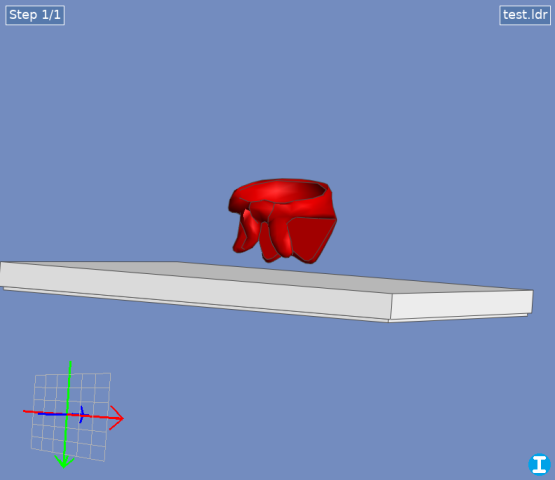
 test.ldr (Size: 173 bytes / Downloads: 2)
Here's how I would approach it:
- Find the lowest point and set it as the rotation center. You could use a helper part or a marker, but how do you find the point itself? Easiest way would be if you could directly select the vertex—LDCad can't do this, but LDPE can.
- Find the next lowest point the same way, then using more helper parts and some trigonometry (or the handy, but unofficial, right angle calc script), rotate the part so this hits the ground.
- For the final rotation, select the third low point, and rotate around a vector formed by the first two points. LDCad does allow custom vector rotation—but how do I find the vector and enter it into the rotation dialog?
Even better would be if you could select all three points at once and use them to define a plane, then set the part's absolute rotation just once so that this plane matches the ground plane. This could probably be scripted, but there's still the problem of selecting the points in the first place.
Is there a better way? How would you approach this problem?
(Can't attach the .lua file for the angle script, but here it is
Code: function onRun()
local sel=ldc.selection()
if sel:getRefCount()<3 then
return
end
local a=sel:getRef(1):getPos()
local b=sel:getRef(2):getPos()
local c=sel:getRef(3):getPos()
local ba=a-b
local bc=c-b
local n=bc:getCross(ba)
n:normalize()
local bb1=n:getSignedAngle(ba, bc)
local bb2=math.deg(math.acos(bc:getLength()/ba:getLength()))
local angle=-(bb1-bb2)
ldc.setClipboardText(angle)
ldc.dialog.runMessage(angle)
end
function register()
local macro=ldc.macro('Right angle rotation calc')
macro:setEvent('run', 'onRun')
end
register()
|

|
|
| merge brick |
|
Posted by: HWQ - 2022-07-19, 8:11 - Forum: LDraw File Processing and Conversion
- Replies (2)
|
|
I created a model in software using 1X1plate I created a model in software using 1X1plate
Is there a way or a script (preferably a script..) to quickly convert or convert to 1x2 1x3 1x4 tiles
thanks
|
|
|
|
| LDraw.org 2022-04 Parts Update Now Available |
|
Posted by: Orion Pobursky - 2022-07-19, 4:42 - Forum: LDraw.org Announcements
- Replies (6)
|
 |
The 2022-04 LDraw Parts Update has been released. This update adds 631 new files to the core library, including 391 new parts and 20 new primitives.
Thanks are due to all the part authors who created or corrected parts for this release. The small, but dedicated, band of reviewers also play an important role in keeping files moving through the Parts Tracker and deserve just as much credit. This update wouldn't have been possible without their dedication and attention to detail.
You can preview the new parts in 2022-04 here, and download the zip-file update or Windows install package here. Alternatively you can use the LDView menu option File | Check for Library Updates... to install the update.
Orion Pobursky
LDraw.org Parts Library Admin
|
|
|
|
| RCX 1.0/1.5/2.0 Modules |
|
Posted by: Orion Pobursky - 2022-07-18, 14:20 - Forum: Parts Authoring
- Replies (28)
|
|
Here's a guide to numbering for the RCX modules for someone looking to create 1.5 and 2.0:
RCX 1.0 module:
76048: Complete Assembly
32109 (already made): Battery cover
32110: IR "glass" on the front
32116: The green, lower part where the batteries go
32058: The yellow, upper part without the clear plastic screen protector and unprinted
32058p01: 30258 with RCX 1.0 Pattern
32108: The clear plastic screen protector
76113: The yellow, upper part with the clear plastic screen protector
6554 (Already made): The electrical plates, plastic portion
75212: 6554 plus the metal electrical contacts
71748: The circuit board
71645: The gray/green button assembly and the black/red button assembly
Since the top of 884 (the full assembly) is hard coded yellow and I think that part should be color 16, we're going to obsolete 884 and create a new complete assembly with the correct number
RCX 1.5 module:
76454 or 76454c01: Complete Assembly
32109 (already made): Battery cover
32110: IR "glass" on the front
32116: The green, lower part where the batteries go
32374: The yellow, upper part without the clear plastic screen protector and unprinted
32374p01: 32058 with RCX 1.5 Pattern
32108: The clear plastic screen protector
32374p01c01: The yellow, upper part with the clear plastic screen protector (no number known, unlike 1.0)
6554 (Already made): The electrical plates, plastic portion
75212: 6554 plus the metal electrical contacts
?: The circuit board
71645: The gray/green button assembly and the black/red button assembly
RCX 2.0 module:
76454a or uXXXX or 76454c02 : Complete Assembly
32109 (already made): Battery cover
32110: IR "glass" on the front
32116: The green, lower part where the batteries go
32374: The yellow, upper part without the clear plastic screen protector and unprinted
32374p02: 32058 with RCX 2.0 Pattern
32108: The clear plastic screen protector
32374p02c01: The yellow, upper part with the clear plastic screen protector (no number known, unlike 1.0)
6554 (Already made): The electrical plates, plastic portion
75212: 6554 plus the metal electrical contacts
?: The circuit board
71645: The gray/green button assembly and the black/red button assembly
This post will be update as numbers are known.
|
|
|
|
|