Complete Brick built MODOK face?


Brick built MODOK face?
#1
Thumbs Up 
Sorry everyone. Very new to this. I'm looking for the 2x4x2 round MODOK piece. I can't find it anywhere. 

Could anyone help me out?
Reply
RE: Brick built MODOK face?
#2
(2026-11-09, 21:54)Chris Matteson Wrote: Sorry everyone. Very new to this. I'm looking for the 2x4x2 round MODOK piece. I can't find it anywhere. 

Do you have a part or a set number?
Reply
RE: Brick built MODOK face?
#3
(2026-11-09, 22:25)Magnus Forsberg Wrote: Do you have a part or a set number?

Part number 24593pb08 from set 76153
Reply
RE: Brick built MODOK face?
#4
(2026-11-09, 22:58)Chris Matteson Wrote: Part number 24593pb08 from set 76153
Sorry, couldn't the image.
Reply
RE: Brick built MODOK face?
#5
There aren't really any great images for that parts decoration. A couple of vaguely OK ones from reviews of the set but thats about it.
Reply
RE: Brick built MODOK face?
#6
Those are the best I could find:
https://i.ebayimg.com/images/g/~xsAAeSwO...-l1600.jpg
https://i.ebayimg.com/images/g/bicAAeSwt...-l1600.jpg
Reply
RE: Brick built MODOK face?
#7
Gerald LasserThose are the best I could find:
https://i.ebayimg.com/images/g/~xsAAeSwO...-l1600.jpg
https://i.ebayimg.com/images/g/bicAAeSwt...-l1600.jpg

I have those, just zero idea how to make it exist in ldraw.
Reply
RE: Brick built MODOK face?
#8
If its something you want to do yourself the easiest way is to use the ldraw texture projection onto a cylinder function.

Its explained in the ldraw documentation and it's not a lot of fun figuring it out but once you do, basically you can add any texture of anything onto any flat or curved surface of an already existing part without having to do any polygon shenanigans.

If you would rather use Bricklink studio you can do it in about 5 mins (and 4 of those mins are editing the above pictures posted via photoshop)

As you can see here with a quick example. The texture was only quickly cleaned up a bit since I am just using it as an example.
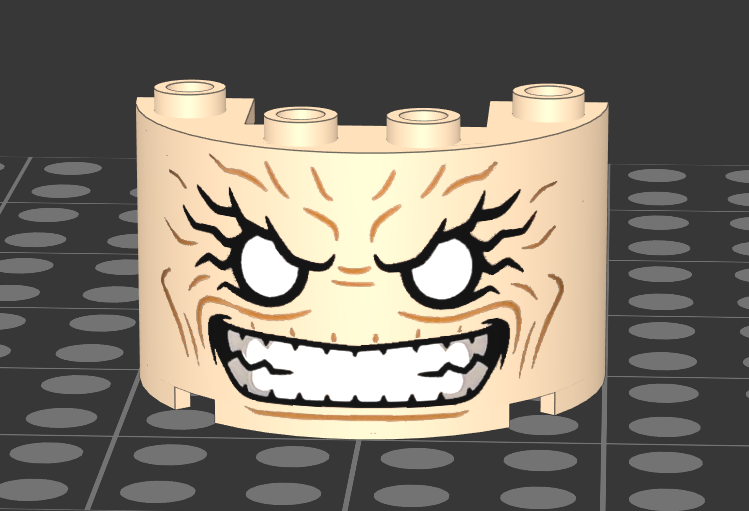
[Image: Screenshot-2026-11-11-024207.png]

Otherwise it means waiting to see if someone on this forum wants to make it as a polygon decorated model.

I've attached my very rough texture I made if you want to use it or edit it further.


Attached Files Thumbnail(s)
   
Reply
RE: Brick built MODOK face?
#9
Now on Parts Tracker... https://library.ldraw.org/parts/55005
Reply
RE: Brick built MODOK face?
#10
(2026-11-11, 2:44)Peter Grass Wrote: If its something you want to do yourself the easiest way is to use the ldraw texture projection onto a cylinder function.

Its explained in the ldraw documentation and it's not a lot of fun figuring it out but once you do, basically you can add any texture of anything onto any flat or curved surface of an already existing part without having to do any polygon shenanigans.

If you would rather use Bricklink studio you can do it in about 5 mins (and 4 of those mins are editing the above pictures posted via photoshop)

As you can see here with a quick example. The texture was only quickly cleaned up a bit since I am just using it as an example.

[Image: Screenshot-2026-11-11-024207.png]

Otherwise it means waiting to see if someone on this forum wants to make it as a polygon decorated model.

I've attached my very rough texture I made if you want to use it or edit it further.

amazing, thank you 🙏

Reply
RE: Brick built MODOK face?
#11
(2026-11-11, 10:40)Philippe Hurbain Wrote: Now on Parts Tracker... https://library.ldraw.org/parts/55005

So sick
Reply
« Next Oldest | Next Newest »


Forum Jump:


Users browsing this thread: 1 Guest(s)