





RE: Decorated Part: 21560 - Looking for artwork
2026-02-18, 14:44 (This post was last modified: 2026-02-18, 15:34 by Paul Haan.)
2026-02-18, 14:44 (This post was last modified: 2026-02-18, 15:34 by Paul Haan.)
Most of my trial and error was manipulating the original file to remove the background and changing the size / placement.
This is the final PNG I used for the part I design I went with.
 venom_eyes_v1.png (Size: 11.24 KB / Downloads: 41)
I did not put it at the angle though. I just plopped it flat above and I thought it worked well enough. I think the angled placement does work much better though. I will be doing that after breakfast.
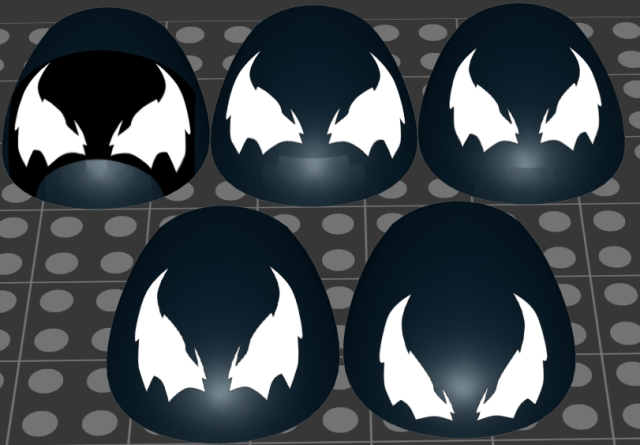
The full evolution of my attempts in Part Designer:
Thanks for the information!
This is the final PNG I used for the part I design I went with.
venom_eyes_v1.png (Size: 11.24 KB / Downloads: 41)
I did not put it at the angle though. I just plopped it flat above and I thought it worked well enough. I think the angled placement does work much better though. I will be doing that after breakfast.
The full evolution of my attempts in Part Designer:
Thanks for the information!
(2026-02-18, 7:01)Peter Grass Wrote: There is no original artwork for that file since its from 2019 and even if there was the lego stuff is UV mapped so for most curved surfaces it just looks a giant mess if you extract it. Studio uses projection mapping which isn't anything to do with UV mapping. That is also why it doesn't look good in the first screenshot since you are applying a flat texture to a curved surface by projecting it onto the surface which doesn't account for the curvature.
What you should have done is remove the black background since the colour 16 (which oddly is lego Tan colour in studio) would be turned to black when you export it into studio and set the part colour. You also need to rotate the texture so its at an angle close to the angle of the part you are applying it to along with aligning it to the correct position.
If you wanted someone to make a polygon version of the part its still someones interpretation of what it looks like.
![[Image: Screenshot-2026-02-18-065757.png]](https://i.postimg.cc/tC2LYwrZ/Screenshot-2026-02-18-065757.png)
![[Image: Screenshot-2026-02-18-065824.png]](https://i.postimg.cc/tgPStMzN/Screenshot-2026-02-18-065824.png)