
Part 6333p01 not functional in Bricklink


Part 6333p01 not functional in Bricklink
#1
I want to use part 6333p01 for a digital build, but when I try to import the model into partdesigner, I get this message:
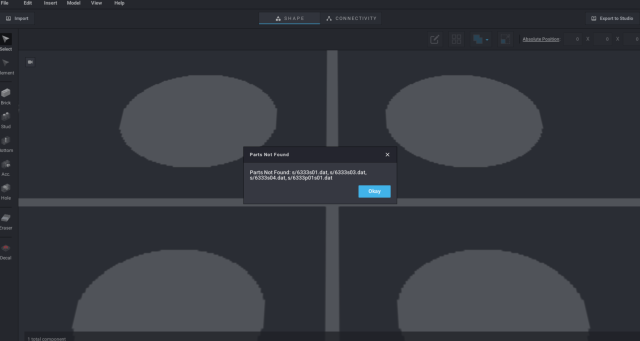
     

This has been an issue for me long before it became an official part. It seems to happen no matter how I go about it, so I'm not sure what to do. Has anyone been able to get the model working?

Reply
RE: Part 6333p01 not functional in Bricklink
#2
have you tried this?

https://library.ldraw.org/library/offici...333p01.zip
Reply
RE: Part 6333p01 not functional in Bricklink
#3
(2026-06-21, 18:30)Jeff Jones Wrote: have you tried this?

https://library.ldraw.org/library/offici...333p01.zip

Oh, awesome, that worked! Thank you so much!


I wonder what was different, because the file I was trying before looked about the same, and was downloaded from the parts list in a zip file.
Reply
RE: Part 6333p01 not functional in Bricklink
#4
(2026-06-21, 19:52)Hylian Waffle Wrote: I wonder what was different, because the file I was trying before looked about the same, and was downloaded from the parts list in a zip file.

1. Subfiles need to be in a ‘s’ folder next to the main file because that’s how they are referenced to in the main file.  That is, the main file says “include s\xxxs01.dat,” “s\” is part of the path.

2. PD caches the contents of every visited folder.  That means that if you forgot to copy/move some files, PD won’t see them until it’s restarted.  More explicitely, if it says “can’t find file X,” and you then copy X next to the main file while PD is still running, it will still complain it can’t find X because it already looked there.

Also, PD doesn’t look for files in other subfolders, like P.  There’s then three cases:
0. Studio already has the files and they are the same version.  No problem, PD and Studio will use Studio’s files.

1. The files aren’t already in Studio.  PD will complain.  Then place them next to the main file and they (or rather their contents) will be used by PD (restarted) and exported to Studo.

2. The files are already in Studio but in older versions.  Then PD will use the new versions if you place them next to the main file BUT STUDIO WON’T!  That is, PD will see and use the new files when you work on them but it won’t use them to export to Studio because Studio already has files with the same names.  If the new version is really different, you need to rename the files and edit the main file to use the new names.
Reply
RE: Part 6333p01 not functional in Bricklink
#5
Another thing you need to know is that an part exported to studio by PD combines the geometry of all subfiles in one. You can loose primitive substitution this way and the part file can also be a bit larger. I usually only use the .conn and .col files and use  the orignal .dat files.
Reply
RE: Part 6333p01 not functional in Bricklink
#6
(2026-06-22, 21:34)Hageta Wrote: Another thing you need to know is that an part exported to studio by PD combines the geometry of all subfiles in one. You can loose primitive substitution this way and the part file can also be a bit larger. I usually only use the .conn and .col files and use  the orignal .dat files.

It only flattens the new files, not the ones that are already in Studio (hence case (2)).
Reply
RE: Part 6333p01 not functional in Bricklink
#7
(2026-06-22, 22:35)Sylvain Sauvage Wrote: It only flattens the new files, not the ones that are already in Studio (hence case (2)).

Did not now that, I just noticed that subfile geometry was included in the exported file.
Reply
« Next Oldest | Next Newest »


Forum Jump:


Users browsing this thread: 1 Guest(s)